Home » System Center Service Manager (Page 7)
Category Archives: System Center Service Manager
Related dates in Service Manager views
My collegue Patrik and I is playing with Service Manager in the sandbox today. We just notice a nice feature when creating views. You can create them based on related dates. For example if you want to show all items modified the last week you could configure the view according to the picture below.

50217 – Planning and Deploying Microsoft System Center Service Manager 2010
Microsoft Learning will release a Service Manager 2010 four-day instructor-led (classroom) course in the beginning of next year. I will deliver this course in Sweden, if you have any questions about the course or want to attend, send me a e-mail at andersATcontosoDOTse . We are planning to deliver this course during Q1 2010.
This four-day instructor-led course provides students with knowledge and skills to plan, install and configure System Center Service Manager. It starts with a one-day workshop on the Microsoft Operations Framework and other methodologies for planning and deploying service management solutions, and then goes deeper into implementing, configuring and integrating Service Manager with other System center products . It also focuses on how IT processes such as MOF & ITIL processes can be implemented side by side with Service Manager.
- Day 1: Using the Microsoft Operations Framework to Set the Baseline for a Service Manager 2010 Implementation
- How MOF and ITIL Processes Support System Center Service Manager
- Change Management
- Configuration Management
- Service Desk
- Incident Management
- Problem Management
- Reviews and Reports
- Policy and Process exercises
- Day 2: Planning a System Center Service Manager 2010 Deployment
- Organizational analysis
- Planning and architecture design
- Deploying Service Manager
- Day 3: Configuring and troubleshooting system center service manager 2010
- Configurations Management and Connectors
- Service Manager Management Packs
- User Roles and Functions
- Troubleshooting Service Manager
- Day 4: Operating and Maintaining System Center Service Manager 2010
- Operating and using the product
- Data Warehouse and reporting
- Self Service Portal
- Maintaining Service Manager
Change Management in System Center Service Manager
I have been testing Change Management in System Center Service Manager beta 1.
ITIL defines the change management process this way:
The goal of the Change Management process is to ensure that standardized methods and procedures are used for efficient and prompt handling of all changes, in order to minimize the impact of change-related incidents upon service quality, and consequently improve the day-to-day operations of the organization.
Change management is responsible for managing change process involving:
* Hardware
* Communication equipement and software
* System Software
* All documentation and procedures associated with the running, support and maintenance of live systems
Source: en.wikipedia.org
System Center Service Manager has a connector to System Center Configuration Manager that synchronizes hardware information and other relevant information to Service Manager. When creating a change request it is possible to pick/select objects syncronized from Configuration Manager. For example if you want to create a change request, regarding a security group in Active Directory, then you can select the group from the list. You can also open the object direct from the change request form, that is a convenient method when you need to verify some information.

Â
Another alternative to start a change request is to select a object and then click create change request from the task bar. Then related items are already filled in. In the example below we want to create a change request involving Vista Service Pack 2.

Â
When creating a new change request there are a couple of templates delivered out of the box. It is possible to create your own templates with pre-defined attributes like area, priority, people to notify, risk level and impact.

On the Related Items tab, of the change request, the creator can add related items like objects from Configuration Manager, Active Directory, documents and files and other work items. Work items can be for example incidents that are related to this change request.Â

When a change is submitted the creator can track the change request on then process tab.

Â
When all activities are carried out and the change request is filled in you can close the change request from the console.
It is possible to configure notification to get notified when something is happening. For example if someone creates a new change request you want to send a notification to all change reviewers.
It is reasonably easy to configure change management templates and notifications based on them. But it is a number of steps to take and a name standard has never been more important. If you don’t have a good name standard you will lose yourself pretty quick. Something that I think most Operations Manager 2007 administrators recognize. There are a couple of notification scenarios where I could see a need of more detailed criteria parameters. But as this is Service Manager beta 1 I guess we will see a lot more features in later beta versions and the RTM version. I think that the biggest obstacle will not be to how to configure Service Manager but instead how to plan and design all your workflows within your organization before you can input them into Service Manager.
If you are interesting in change process flow there is a lot of good information here at TechNet.
Incident Management in System Center Service Manager
I have been testing Incident Management (IM) with focus on the notification part of IM in System Center Service Manager beta 1.
The main goal of the IM process is to get back to a normal service operation as quickly as possible and to minimize the impact on the business, in other words ensuring that the best possible levels of service quality and availability are maintained. “Normal service operation†is defined within Service Level Agreement (SLA).
 In my test environment I built the following workflow:

Incident templates can be utilized to achieve IM flexibility. Incident templates include common settings for different types of incidents. For example when a service desk receives a call from a user who can´t access a network folder, the service desk operator can then apply the network issue incident template and make sure all the necessary information is collected from the user reporting the incident. The templates also guarantee that incidents are configured with correct owner, category, priority and other related items.
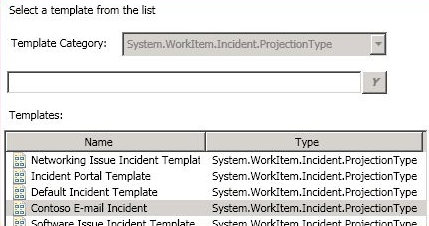
System Center Service Manager has a connector to System Center Configuration Manager that synchronizes hardware information and other relevant information to Service Manager. When a service desk creates an incident and selects which machine the affected user is working from, the service desk can see all information synchronized from Configuration Manager.
In Service Manager there are a number of workflows out of the box and you can also create your own. One of them is Incident Change.

In my test environment I built the following four workflows:
1. One workflow sends e-mail to the affected user when new incidents are created. It is always good for the user to have the incident ID and to know which service desk has begun working on the incident.
2. One workflow sends an e-mail notification to the operator who is configured as “assigned to†in the incident. If it is not the same operator creating the incident who will be working on it, it is good to send a notification.
3. One workflow sends an e-mail notification to the operator who is configured as “assigned to†in the incident. If another operator adds a comment or information to the incident a notification will be sent to the operator who is assigned to the incident.
4. One workflow sends an e-mail notification to both the affected user and the operator who is configured as “assigned to†in the incident.
Service Manager synchronizes information from Active Directory through an AD connector so e-mail addresses and other account information already exists in Service Manager. Here we don’t have to create recipients the same way as we do with subscribers in Operations Manager.
It is reasonably easy to configure incident templates and notifications based on them. There are a couple of scenarios where I could see a need of more detailed criteria parameters. But as this is Service Manager beta 1 I guess we will see a lot more features in the RTM version. I think that the biggest obstacle will not be to how to configure Service Manager but instead how to plan and design all your workflows before you can input them into Service Manager.
System Center Service Manager Roadmap
Yesterday I attend at Michael Nappi session “System Center Service Manager Product Overview”. During this the roadmap of Service Manager was shown.
- 2008 H2, Beta 1 (early December or end of November, will not include the self-service IT portal)
- 2009 H1, Beta 2 (summer 2009, will include the self-service IT portal and will also be feature complete)
- 2009 H2, RC
- 2010 H1, RTM
Service Manager three big investments areas are:
Automated MOF/ITIL process
- Incident Management
- Self-Service IT Portal
- Change Management
System Center Integration
- System Center Configuration Manager
- System Center Operations Manager
- Active Directory
Extensible platform
- Publik SDK
- Linked framework
- Management pack extensibility
System Center Service Manager Beta 1
I would like to tip you about a article from Pete Zerger (reviewed by me and Neale Brown) about Service Manager. It is a intresting article, as always when Pete is involved. You will find it here. You can read more about Service Manager here, and also download the beta from Microsoft Connect here.
I have written a general installation guide. It is not a complete step by step guide. You can download it here.
Beta 1 of System Center Service Manager
Beta 1 of System Center Service Manager is now available for download on the Microsoft Connect website. Beta 1 includes a number of functionality:
- Distributed install
- Administration wizards for easy solution configuration
- AD connection wizard · SMS 2003 SP3 connection wizard
- Asset inventory including the first phase of asset reconciliation in the CMDB
- Incident management including queues, customizable drop-down values, asset linking, and notification workflows
- Change management including queues, customizable drop-down values, asset and incident linking, multiple review stages, activity management and notification workflows
- A self-service portal which includes knowledge search, service request submission, and software provisioning integrated with SMS 2003 SP3
- Knowledge Management including authoring, viewing, comment and rating all integrated with Word 2007 and SharePoint 2007
- Data Warehousing and Reporting including 6 sample reports for incident, change and asset data
Â
Microsoft System Center “Service Deskâ€
I run into the Microsoft System Center “Service Desk†timeframe on a wepage
- Beta1: December 2006 (TAP is running)
- Beta 2: end of April 2007
- RC: beginning of July 2007
- RTM: December 2007
There will be a public beta around March 2007 (according to the rumor) Â
There are a couple of screenshots at this and this page. You can find more information about “Automating IT Service Management with System Center” here
Recent Comments