New connect site for the OpsMgr community
Yesterday the product group launched a new connect portal that will allow you to provide feedback to the OM team as well as participate in surveys that have been traditionally reserved for TAP programs. All you need to do is be registered on connect and you’ll be able to participate. Check it out here.
Notification based on a distributed application in R2
In Operations Manager 2007 Sp1 when you created a distributed application there was also a group created, including all objects in the distributed application. I cant find a corresponding group in Ops Mgr R2. I used that group for notification, notification for everything in a distributed application. If you want to do the same thing in R2, get notification for all new alerts for all objects in a distributed application, you can
1. Create a distributed application
2. Create a new group with the following forumla “( Object is Contoso - Distributed Application - Spoolers AND ( Display Name Matches wildcard * ) AND True ) “. “Contoso – Distributed Application – Spoolers” is the name of my distributed application. To build the forumla select your distributed application as class and then “Display Name Matches wildcard *” as expression. Remember to add the forumla under dynamic members.
3. Create a new subscription with the following subscription critiera
Notify on all alerts

raised by any instance in a Contoso - Group - Print Spooler DA group

and with New (0) resolution state
“Contoso – Group – Print Spooler DA” is the name of my group.
Notification and reporting for maintenance mode
When a monitored object, such as a computer or distributed application, goes offline for maintenance, Operations Manager 2007 detects that no agent heartbeat is being received and, as a result, might generate numerous alerts and notifications. To prevent alerts and notifications, place the monitored object into maintenance mode. In maintenance mode, alerts, notifications, rules, monitors, automatic responses, state changes, and new alerts are suppressed at the agent.
More info about maintenance mode here (source).
Boris Yanushpolsk wrote a power shell script to use to see what is actually in maintenance mode. You run the script in Operations Manager command shell. If you want to publish this information to a web page, for example to share it between colleagues, you can use this modified version of the script. You could also schedule the script to make sure you have an updated web page all the time.

Â

If you want to get notified when a new maintenance window starts you could use the following script to get a notification. This script will send you an e-mail with information regarding new maintenance windows. It will also log the information to a logfile that you later can use to generate reports for maintenance windows within your environment. Read this post about generating reports based on logfiles. Download the script here. Remember to rename the file to .ps1 and run it from Operations Manager command shell. The following picture shows a notification e-mail from the script.
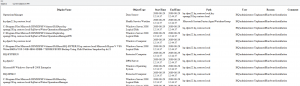
With default settings the script will look for maintenance windows created in “now-72 hours”. You can change this with the $seconds, $hours and $hours variable. For example if you schedule the script to run every two minute you want to change it to $minutes=2. If you want the script to generate a logfile you will need to change $log to $true. If you want to get notified with e-mail you need to specify $e-mail=$true and then smtphost, from, to and subject.
Big thanks to Marco Shaw (power shell MVP), read his blog here.
Recent Comments