Home » 2007 (Page 10)
Yearly Archives: 2007
 Quick Calls in Service Manager 2010
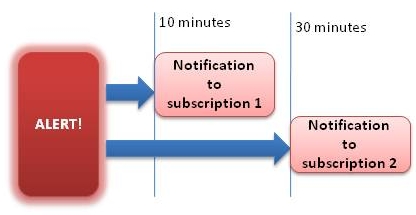 Alert Aging
Where did repeat count go?
Are you missing the repeat count column in Operations Manager 2007 default Active Alert view? Then you can simple right-click the view, choose “Personalize view…” and check “Repeat Count” under “Columns to display”. Then click OK and you have the repeat count column again. Note that in the “Personalize View” window you can choose how to sort columns, for example if you choose severity you will fast see which alert in the view that are the most serious.Â
Alert Resolution States
As you might notice there are only two resolution states in Operations Manager 2007, new and closed. Most likely you want to add more states. That you can do like this:
- Start Operations Console
- Click Administration and then Settings
- Right-click Alerts and choose Properties
- In the “Global Management Group Settings – Alerts” windo click “New…” and add resolution state. Click Ok, and then Ok again in the first box.
- Now you can right-click a active alert (under Monitoring)Â and set the new resolution state
MOM 2005 and WIN SRV 2003 SP2
According to this KB Microsoft Operations Manager 2005 will work with Windows Server 2003 SP2.
Operations Manager 2007 is RTM
System Center Operations Manager 2007 is RTM, Released to Manufacturing. Build 06.0.5000.0 was the golden version. There will be a trial version available soon, at Microsoft System Center webpage, here.
MOMResources.org v2 – RTM 03/23/2007
Finally the new site has arrived – with new features you requested, as well as a new name! To reflect our expanding focus on Operations Manager 2007 and other components of the Microsoft System Center Suite, the new site has been dubbed systemcenterforum.org.
We’ll have a strong focus on the successor to MOM 2005, offering expert guidance and support from both a conceptual perspective as well as the detailed “hands on†aspects of design, implementation and administration. We’ll also bring you System Center and industry-related news relevant to the IT operations management space, as well as reviews of 3rd party ISV offerings, which will be a greatly expanding field for the new generation of the MS operations management platform.
New features on the site include indexed search, RSS (both category feeds and a master site rollup including all new additions), an Events Calendar and searchable FAQs. Note that the first download from the rollup feed may include some migrated content.
Existing momresources.org content – We’ve moved the existing downloads from MOMResources.org to the new site, where it is fully indexed and searchable. We’ll also leave the existing content downloadable via their original momresources.org URL’s to respect the many references present in the MS newsgroups and various community sites.
Check last modified for a directory
I have done a simple script to check last modified on all files in a directory. This example will generate a local event if files are older then 2 months.
strComputer = "."

Const EVENT_WARNING = 2

Set objWMIService = GetObject("winmgmts:" _

    & "{impersonationLevel=impersonate}!\\" & strComputer & "\root\cimv2")
Set colFileList = objWMIService.ExecQuery _
   ("ASSOCIATORS OF {Win32_Directory.Name='C:\'} Where " _
       & "ResultClass = CIM_DataFile")
For Each objFile In colFileList
   Set objFSO = CreateObject("Scripting.FileSystemObject")
 Set objFile = objFSO.GetFile(objFile.Name)
Â
 Set objShell = CreateObject("Wscript.Shell")
 If DateDiff("m", objFile.DateLastModified, Now) > 2 Then
 objShell.LogEvent EVENT_WARNING, _
 "objFile is older than 2 months. Please investigate. The file is: " & objFile
 end If
Next
For more settings, please see this post.
For more settings, please see post.
Management Pack Objects OpsMgr 2007
Are you running OM 2007 yet? If you do, you have presumably noticed all new features.  When you look in the Authoring pane of the Operations Console you will see a number of new features under management pack objects. In this post I will try to explain some of the news regarding management packs.
Â

Attributes are almost the same as in MOM 2005, but here are a couple of news that you should know as a OM 2007 administrator. In MOM 2005 a attribute check one registry key or a registry value. In OM 2007 a attribute can check the registry or WMI query, this is controlled by the “Discovery Type”. When creating an attribute an object type must be selected as a target for it. A object type can include a number of attributes, for example a number of registry values. You can then create a group that has a dynamic inclusion rule for servers that only have that object type. In MOM 2005 you did this with a forumla at the computer group object. Â
Monitors
What is the main diffrence between a rule and a monitor?
For example, a monitor can be used to estimate the state of a event (if it exist) or the value of a performance counter. The result of that control the health state of a target and the alerts that are generated. There are three types of monitors:
Object Discoveries
Object Discoveries are used to find objects in the network that need to be monitored. In a management pack there are a number of types of objects that the management pack monitors. Every management pack also includes object discoveries to find the specific objects on the network that are of the types monitored by the management pack. Under the object discoveries node you will see a list of all object discoveries in the management group.
Rules
Rules are like rules in MOM 2005, used to collect data and generate alerts. Rules can be used for a large number of reasons, the most common scenarios are:
Tasks
Tasks are used to run commands/action on managed machines. A great feature in OpsMgr 2007 is the possibility to combine run-as accounts with tasks. The default account for tasks are the action account.
Views
Views are groups of managed objects that have commonality, which is defined in the view properties. When you select a view a database query is made and the result of the query are displayed in the result pane. There are a number of views that you can access from the opertions console
Â
System Center Updates Publisher
System Center Updates Publisher is an add-on application designed to extend the software update management functionality in System Center Essentials 2007. It provides SCE administrators the ability to import, create, and publish custom software update information to their SCE server. By using the Updates Publisher to define a custom software update and publish it to the server, a SCE administrator can begin detecting and deploying that update to the client and server computers in their organization. The System Center Updates Publisher enables SCE administrators to do the following:
Source: MS Connect webpage
You can download it from the MS Connect website, here.
Verify that a File Exists
This is a simple script that will check if a file exists, if not it will generate a warning event in the local event viewer. You can pick up that event with a rule from MOM. In this example, the script verify if C:\pagefile.sys exists.
Set objFSO = CreateObject(“Scripting.FileSystemObject”)
strFile = “C:\pagefile.sys”
If objFSO.FileExists(strFile) Then
   Set objFolder = objFSO.GetFile(strFile)
Else
   Const EVENT_WARNING = 2
   Set objShell = CreateObject(“Wscript.Shell”)
   objShell.LogEvent 2, strFile & ” is not accessible.”
End If
Updated: Configuring Notification in OM 2007
Pete and I updated our guide on configuration of notification in OM 2007. The updated version includes steps for configuration of self-service notification as review of enhancements in the notification engine. You can download the new version here
Recent Comments