Home » Articles posted by Anders Bengtsson (Page 32)
Author Archives: Anders Bengtsson
 Run a runbook with a specific account
 User does not have permissions to access the Service Management API
Override Overrides
Today I have been testing override overrides, when we have two overrides overriding the same setting with different thresholds, for the same target machine.
First I created a monitor to check for event ID 1 in the Application log. With default settings there should be an alert generated with medium alert priority.
I then create a override for “For a specific object of type: Windows Server 2003 Computer”, my DC1 machine. I changed the alert priority to high. I validated my override by generating an alert, and I could see that alert priority now was high.
I then created a second cverride for “For a group…”, a group including my DC1 machine. I changed the alert priority to low. I now I had one override for the DC1 computer and one override for a group including the DC1 computer. The new alert comes with high priority. So far, the newest override is the one Ops Mgr use.
If I do this the other way around, first configure a override for the group and then a override for my DC1 computer object I get the same result, the newest override is the one Ops Mgr use.
When you look at the override properties for a monitor you can see a column named “Enforced”. If I check enforced on my first override (low priority) and then generate an alert I get alert with low priority, in other words if you use the enforced function you can force a override to be applyid.
But what if both overrides has the enforced function enable? When you have enforced a override and you open the overrides summary window you can see two different “Changed value”, in my scenario I can see “Low” and “High”. If I now want to enforce the override with high alert priority, I select it and click Edit, but in the Override Properties window, I see that “Effective Value” is set as a enforced value and in the “Effective Value” column I now see Low. Â
Summary. The newest override is the override that Ops Mgr will use. If you enforce a override it will overrite all other overrides and be the one that Ops Mgr use. You cant enforce two overrides for the same target and monitor.
Â

Â
Cross Platform Extensions in the Sandbox
After a couple of hours in the sandbox with the new cross platform extension beta I must say it is very cool and I think this will end a lot of discussions. There is never a question which product to choose to monitor Microsoft technologies, but I often discuss Linux and non-Microsoft monitoring with customers that are about to but a new monitoring solution. Here are a couple of screenshots from today
- This is the health explorer for a SUSE Linux Enterprise 10 SP1 machine
- This is from the monitoring workspace, my SUSE machine is healthy and green
- This one is showing a alert, something is wrong with the syslog daemon
- This is the health explorer with the syslog error, note the “syslog restart” task
- This one is showing the “syslog restart” task


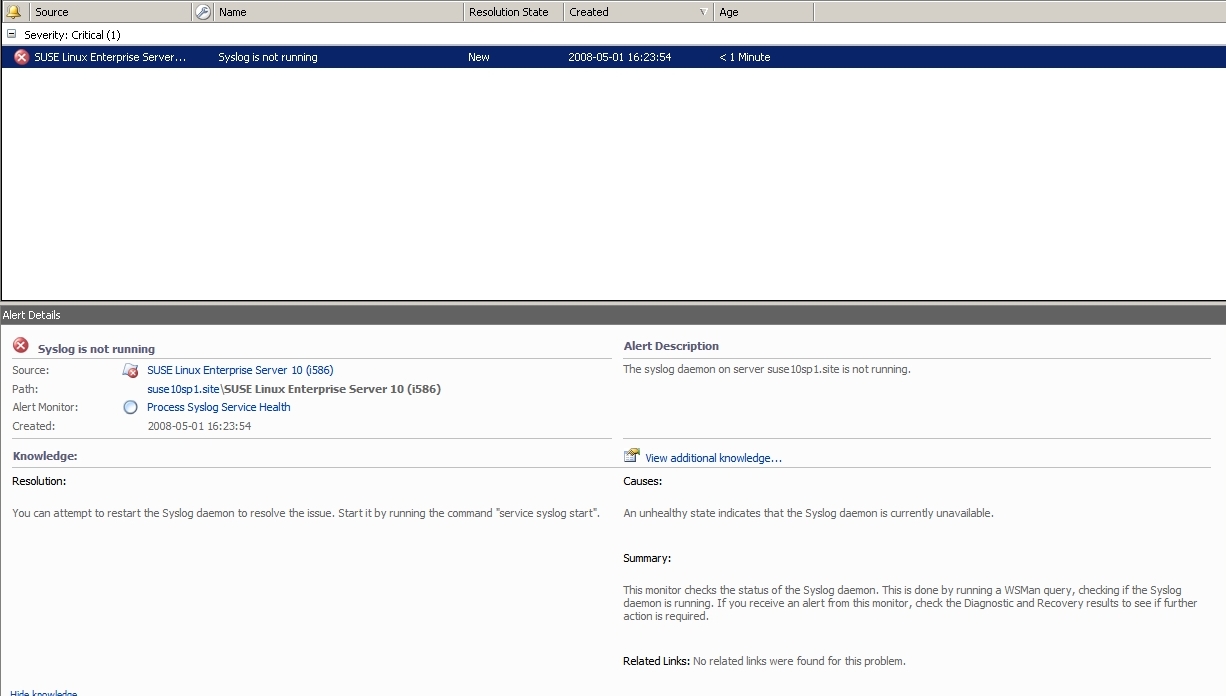


In the screenshots you can see how I first receive an alert regarding the syslog daemon on my SUSE machine (SLES-10-SP1-i386-DVD1.iso). I then simple restart the daemon from health explorer, really nice!
When working with the cross platform extension there are a couple of commands that are useful commands
- service, stop, start and restart services, for example “service ssl stop” to stop the ssl service. This will generate an alert with default SUSE management pack.
- cat /etc/SuSE-release , show which version of SUSE you are running.
- shutdown -r now , to restart the machine direct (now)
- To troubbleshoot WSMan you can raise the loglevel, edit this file /etc/opt/microsoft/scx/conf/openwsman.conf and change loglevel (4) to 6. You will then see all Ops Mgr connections in /var/opt/microsoft/scx/log/wsman.log . Be aware that this file can grow very rapid. There are also a couple of other related logfiles in /var/opt/microsoft/scx/log
Â
Operations Manager 2007 Cross Platform Extensions
Today Microsoft announced a new beta product, the System Center Operations Manager 2007 Cross Platform Extensions, which enable you to manage Unix/Linux systems from Operations Manager 2007. This extension is in beta and you can download it at MSFT Connect website.
Check the MSFT cross platform team blog here.
Check Registry Value
I have seen a lot of questions and discussions about monitoring registry values. You can do this with a script. I have written a script that reads a binary value out of the registry and check if the value is the same as the script says it should be, if not it will generate a local event, that Ops Mgr or MOM can pickup and generate an alert on. You can download the script here. You can download the script here. If you instead want to store the value in a textfile, you can see a lot of examples of that here.
For the registry reading part there are more examples here, for example how to read other registry object types.
Logfile name
When you create monitors or rules to check logfiles you might want to include both the logfile directory and logfile name in the alert description. You can do that with the following parameters
For monitor:
Logfile Directory : $Data/Context/LogFileDirectory$
Logfile name: $Data/Context/LogFileName$
String: $Data/Context/Params/Param[1]$
For rule:
Logfile Directory : $Data/EventData/DataItem/LogFileDirectory$
Logfile name: $Data/EventData/DataItem/LogFileName$
String: Â $Data/EventData/DataItem/Params/Param[1]$
Kevin Holman, a premier field engineer at Microsoft, has a great list of parameters at his blog, here.
Side by side migration
Here are some experience regarding management packs from a side by side migration between MOM 2005 and Ops Mgr 2007.
Exchange 2003 MP
There is problem with Exchange APIs handling the mail flow check. It looks like both MOM 2005 and Ops Mgr 2007 are sending mails, but only MOM 2005 recive them. The other component of the Exchange 2003 MP is working fine.
AD 2003 MP
You cannot monitor a domain controller running 64-bit Windows Server 2003 with Operations Manager 2007 and Microsoft Operations Manager 2005 at the same time, because the MOM 2005 agent running on 64-bit domain controllers is the 32-bit version of the agent, but the Ops Mgr 2007 agent is a 64-bit version. The MOM 2005 agent contains the 32-bit version of the Active Directory Helper Object (OOMADS) and the Ops Mgr 2007 64-bit agent cannot use the 32-bit OOMADS. In other words, if you have 64-bit domain controllers you will have to decide when you switch them over from MOM 2005 to Ops Mgr 2007.
There was no bigger problems found within the Base OS MP, DNS MP, IIS MP, Cluster MP, SQL MPÂ or DHCP MP.
Group membership based on disk device name – part II
Sometimes you need to include two or more volumes in a group.
- Create a new group.
- On the “Dynamic Members†tab select “Windows Logical Hardware Component†as class and click Add
- Right-click “AND group for Windows Logical Hardware Component…” and select “Switch to Or Group” from the context menu.
- Select “Device Name” as property, select Equals as Operator and input the volume name as value, for example C:
- Click Insert and select Or Group
- In the new OR group, select “Device Name” as property, select Equals as Operator and input the volume name as value, for example E:
- Click Ok and close the group wizard
 The formula should look like this:
( Object is Windows Logical Hardware Component AND ( Device Name Equals C: ) OR ( Device Name Equals E: ))

Group membership based on disk device name
Sometimes you need to create new values for every volume with the same drive letter, for example all Quorum (Q:) disks. You can then create a dynamic group that includes all volumes with a specific device name.
Create a new group. On the “Dynamic Members” tab select “Windows Logical Hardware Component” as class, then “Device Name” as property and suitable operator and value. For example if you want to select all C: volumes, the query will look like
( Object is Windows Logical Hardware Component AND ( Device Name Equals C: ) AND True )
Â
System Center Virtual User Group
As you might have read earlier, the System Center Virtual User Group was launched, on March 27th. It’s a user group dedicated to providing resources for education and collaboration between users of Microsoft System Center technologies everywhere. Check it out at www.systemcenterusergroup.org.
To get the user group off to a fun start, we were discussing the possibility of hosting a contest for the best custom System Center solution, and need to know if you’d be willing to participate. Please read the following, and then post a comment to this thread if you would be willing to play.
The contest would showcase the best custom System Center community solution for a number of categories, including custom Management Pack (Opsmgr / Essentials), Configuration Pack (SCCM), Scripts (any System Center product), etc. Users would submit their entries to the site for judgement by a panel of System Center experts. Prizes would include XBOX 360 (for the overall winner), a Zune for the first couple of runners-up overall, and then books and miscellaneous prizes for the runners-up in each category.
Would you be willing to participate?
If so, register on the site (free) and add a comment to this post. If it looks like there will be a good number of participants, we will announce something official in the next few days! So, what are you waiting for?
Configuring Redundant ACS Collectors in Ops Mgr 2007 SP1
New in SP1, Microsoft will now allow two ACS collectors to point to the same ACS database, but with only one active at a time. One acts as the primary collector, the other acts as the failover/secondary collector, which can only be enabled when the primary one failed or is disabled.
Pete Zerger and I have written a step-by-step walkthrough of the configuration and testing process for redundant ACS collectors. You can download the guide here.
Recent Comments