Home » 2007 (Page 7)
Yearly Archives: 2007
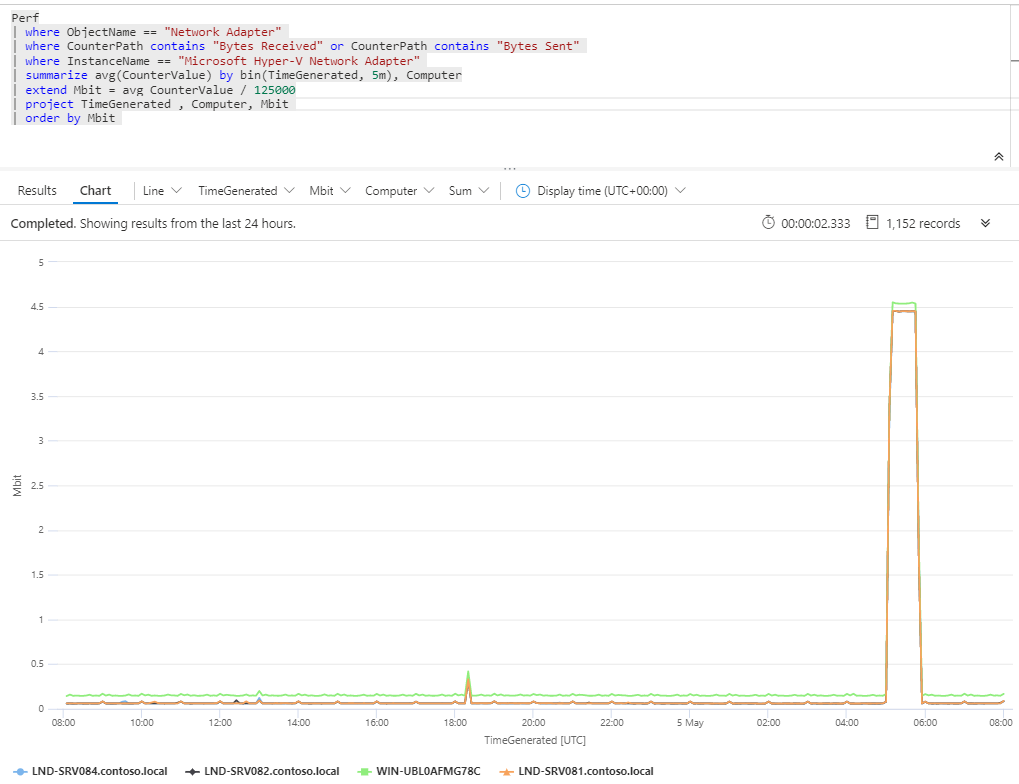 Measure bandwidth with Azure Monitor
How to list a file from a agent managed computer
A saw a question in a news group about listing files on agent managed computers from the web console in Ops Mgr 2007. After some thinker and discussion with Mikael Nyström I found the solution. First, it has to be a agent task to show up in the web console. In this example I will list the C:\WINDOWS\win.ini file on the agent managed computer, in the real world it could be for example a logfile from a application. The result will be shown in the task result box.
- Start the console, click Authoring and then expand Management Pack Objects
- Right-click Tasks and choose to create a new task
- In the Create task wizard – Task Type, choose Agent Task and Command line, choose your destination management pack and click Next
- In the Create task wizard – General Properties, input a task name, a description and choose target, for example Windows Server 2003 Computers as target. Click Next
- In the Create task wizard – Command Line, input
Full path to file: C:\WINDOWS\SYSTEM32\cmd.exe
Parameters: /C type %WINDIR%\WIN.INI
You dont have to input a working directory. Click Create
Now, open the web console (http://servername:51908) and test your new task.
Beta 1 of System Center Service Manager
Beta 1 of System Center Service Manager is now available for download on the Microsoft Connect website. Beta 1 includes a number of functionality:
- Distributed install
- Administration wizards for easy solution configuration
- AD connection wizard · SMS 2003 SP3 connection wizard
- Asset inventory including the first phase of asset reconciliation in the CMDB
- Incident management including queues, customizable drop-down values, asset linking, and notification workflows
- Change management including queues, customizable drop-down values, asset and incident linking, multiple review stages, activity management and notification workflows
- A self-service portal which includes knowledge search, service request submission, and software provisioning integrated with SMS 2003 SP3
- Knowledge Management including authoring, viewing, comment and rating all integrated with Word 2007 and SharePoint 2007
- Data Warehousing and Reporting including 6 sample reports for incident, change and asset data
Â
New Management Packs
A couple of new management packs has been published. Most of them requires Ops Mgr 2007 MOM 2005 backward compatibility management pack Update 6.0.5000.1 (or higher), download that here.
Microsoft Windows SharePoint Services 3.0 Management Pack for Operations Manager 2007
Date Published: 6/4/2007
Download here
Microsoft Office SharePoint Server 2007 Management Pack for Operations Manager 2007
Date Published: 6/4/2007
Download here
Microsoft Print Service Management Pack for Operations Manager 2007
Date Published: 6/4/2007
Download here
Microsoft Windows File Replication Service 2000/2003 Management Pack for Operations Manager 2007
Date Published: 6/4/2007
Download here
Microsoft Windows Group Policy 2003 Management Pack for Operations Manager 2007
Date Published: 6/4/2007
Download here
Microsoft Windows Server 2000/2003 DHCP Management Pack for Operations Manager 2007
Date Published: 6/4/2007
Download here
…and also a new version of Systems Center Operations Manager 2007 Documentation as been published here
System Center Guides
System Center Essentials 2007 Migration Guide
This guide discusses various scenarios for upgrading to System Center Essentials 2007, and also includes a brief discussion of outgrowing and migrating from Essentials to System Center Operations Manager 2007. The guide includes the following:
• Migrating from WSUS to Essentials 2007
• Migrating from Operations Manager to Essentials 2007
• Migrating from Systems Management Server 2003 or Configuration Manager 2007 to Essentials 2007
• Outgrowing Essentials 2007: Migrating to Operations Manager 2007 and Configuration Manager 2007
Download here
System Center Essentials 2007 Operations Guide
This guide discusses best practices for everyday use of System Center Essentials 2007. The guide includes the following:
• Getting Ready to Operate Essentials 2007
• Managing Computers
• Monitoring Network Devices
• Deploying Software and Updates
Download here
New Version of Operations Manager 2007 Active Directory Management Pack Guide
This guide includes an overview, deployment procedures, and monitoring scenarios for the Active Directory Management Packs for Microsoft System Center Operations Manager 2007. Date Published 1-6-2007. Whats new?
- Domain discovery that enables Operations Manager 2007 to automatically discover domains in your Active Directory environment
- New performance and client monitoring views to provide more ways to view your monitoring data
- A new child domain topology view, allowing you to see subdomains of other domains
- New dashboard views that combine multiple views into one view to allow analysis of trends and similarities between related metrics
Download here
OpsMgr 2007 MOM 2005 Backward Compatibility MP Update
Overview Updated MOM 2005 Backwards Compatibility MP (6.0.5000.1) and System Center Internal Library MP (6.0.5000.1).
Update to address fixes and enhancements:
– New Backward Compatibility Threshold monitoring type using in Converted MOM 2005 MPs which exposes Threshold values as overrides.
– Fixes to the Backward Compatibility Cluster discovery to address problem with converted MPs that monitor clustered Applications  Installation: After unpacking of the MSI files import the following MP files:
Folder (default): %ProgramFiles%\System Center Management Packs
– System.Mom.BackwardCompatibility.Library.mp
– Microsoft.SystemCenter.Internal.mp
The MP will replace the existing version of the filesManagement Pack Release History:
Initial Release 3/23/2007 Version 6.0.5000.0
Download here
Delta Threshold Monitor
A delta threshold monitor measure the change, for example a change of X GB on a driver during Y minutes or a change of X procent during Y minutes. Here is a short step by step guide
- In the console, under Authoring, Management Pack Objects, Monitors, create a new monitor
- Choose to create a new unit monitor, Windows Performance Counters/Static Thresholds/Single Threshold/Delta Threshold, click next
- Input a rule name and choose rule target, choose Availability as parent monitor, click next
- Click browse a choose a object, for exampleObject: LogicalDisk
Counter: Free Megabytes
Instance: C:ÂSpecify the interval and then click next
- Enter a threshold, for example 100 for 100Mb. Click next
- On the Configure Health window, click next
- Check “Generate alert for this monitor”, input a alert description, click Create
This monitor will generate an alert if someone add or remove 100Mb on C: during 15 minutes (default value).
New version of SQL MP for MOM 2005
Includes support for SQL 2005 SP2; improved product knowledge; improved support for localized versions (Version : 9.0.2047.0000).
Download here
Monitor a logfile with Ops Mgr 2007
I saw a question about monitoring a logfile with Ops Mgr 2007. Here is a short step by step guide
- In the console, under Authoring, Management Pack Objects, Rules, create a new rule
- Choose to create a Alert Generating Rules/Event Based/Generic Text Log (Alert), click next
- Input a rule name and choose rule target, click next
- Input a directory, for example C:\, input a pattern, for example logfile.log, click next
- Input the following expression,
Parameter Name = Params/Param[1]
Operator = Matches wildcard
Value = warning
click next - Configure a suitable alert and then click create
Please note that this rule is case sensitiv, so it will make difference between WARNING and warning.
Windows Base Operating System Management Pack for MOM 2005
A new version of the Windows base OS MP is available, version 05.0.3500.0010, date published 5/29/2007.
The Microsoft Windows Servers Base Operating System management pack 05.0.3500.0010 introduces monitoring of additional components available within the Microsoft Windows Server 2003 R2 operating system including Identity Management for UNIX(IDMU), Hardware Management events,NTFS file system monitoring, File Server Resource Monitoring (FSRM), Shadow Copies for Shared Folders (SCSF) Monitoring and more (See Management Pack Monitoring Scenarios with the Management Pack Guide for more information).
Download here
Recent Comments